For drywall and partition contractors
Drywall takeoff software for fast partition quotes
Measure drywall partitions on PDF plans, price by m² or linear metre, and export client-ready quotations without rebuilding the schedule in Excel.
Drywall takeoff in five steps
From plan PDF to priced partition schedule.
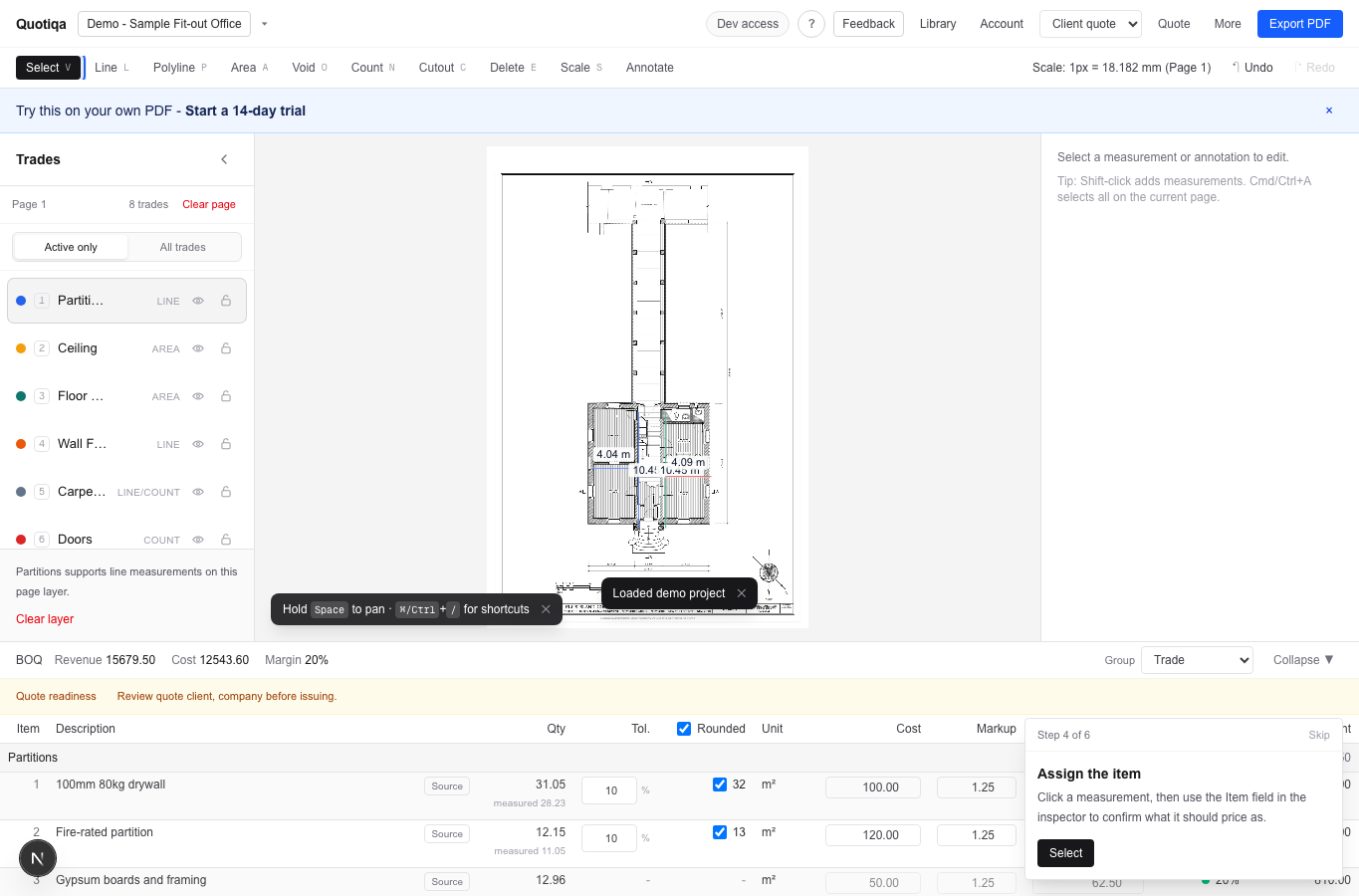
The same workflow whether the project is a 4-room office, a hospital fit-out, or a multi-floor refurb: calibrate scale, measure partitions, assign item types, price, export.
03 / Measure
Scope captured
Measure by fit-out trade.
From plan to quote
Measure by fit-out trade.
Lines, areas, and counts stay tied to trades like partitions, ceilings, carpentry, doors, and system furniture.
- Line
- Partitions, carpentry
- Area
- Ceiling, floor finishes
- Count
- Doors, furniture
Built for partition trades
Item types that match how you actually quote drywall.
100mm 40kg, 100mm 80kg, fire-rated, acoustic, single-glazed framed, shaftwall, custom — each with its own height default, cost, markup, and sell rate. Cutouts handle doors and openings without breaking the partition run.
For wider trade scope, see fit-out takeoff software.
Quote simulator
See partition lines, rates, and the client quote move together.
Click through the same proof path a demo covers: plan, measured partitions, priced quote items, readiness review, and client quotation output.
Quote simulator
Measured scope is attached to fit-out trades.
Lines, areas, and counts become structured quantities immediately.
Quote items preview
Readiness checks
Plan file
Ready
Scale
Ready
Rates
Review
Quote trust
Checks before the partition quote leaves your desk.
The export remains available, but Quotiqa surfaces the things that usually cause partition-quote rework before the client sees the PDF.
Qualified demo
See whether Quotiqa fits the next partition quote on your desk.
The aim is simple: prove whether PDF takeoff, partition rates, and quotation export can remove the spreadsheet handoff from your drywall quotes.
Paid pilot
Team Pilot: S$299 first month for up to 3 estimators
Includes onboarding, one price-list setup, one quote-template review, and first real quote support. Team continues at S$249/month after the assisted first month.
Book pilot walkthroughWhat happens after the demo
Privacy-safe proof
Demo form does not upload project files.
PDFs, measurements, and rates stay in browser storage.
Sample plan uses public-domain HABS/LOC source material.
FAQ
Drywall takeoff, fast quotes, no spreadsheet rebuild.
Is Quotiqa specifically for drywall?
Quotiqa is built for interior fit-out scope, with drywall partitions as the core measurement type. Linear metre and m² takeoff, partition height defaults, door and opening cutouts, and per-rate pricing are all wired for partition workflows out of the box.
Can I price drywall by m² and by linear metre?
Yes. Each item type has a default unit (m² for area-priced partitions, m for run-priced framing) and rates are remembered globally and per project. Switch unit on a single line or in bulk from the inspector.
Does it handle fire-rated and acoustic partition rates separately?
Yes. Item types are independent — 100mm 40kg drywall, 100mm 80kg acoustic, fire-rated, single-glazed framed partitions, and any custom item you create each carry their own cost, markup, and sell rate. Quotiqa keeps a baseline snapshot so deviations from your usual rates show up before export.
Will my existing rates carry across projects?
Yes. Project rates are remembered globally so the next quote starts from your last known prices. Duplicate a prior project to inherit the full pricing structure, including custom partition types.
How fast can I get the first drywall quote out?
Target is under 5 minutes from a fresh PDF for a small partition scope: upload, calibrate one wall against the title block, draw partitions, assign types, export. The sample project demonstrates the same path before you start a trial.
Can we subscribe without a sales call?
Yes. Start a 14-day no-card trial, then subscribe through Stripe. Book demo remains available for teams that want the S$299 first-month Team Pilot with onboarding and a price-list review.